

Shuffle Casino offers a organized registration process that enables new players to set up an account, authenticate their identity, and enter the platform’s full range of games. The steps are intended to meet Canadian regulatory standards while staying simple for users who follow the sequence carefully. This article outlines each stage of account creation, verification, and security setup so that readers can complete the process without unnecessary delays or repeated submissions.
Funding Options and Initial Funding Limits
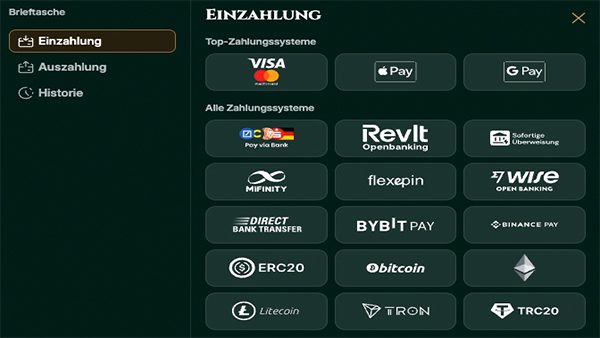
After verification and 2FA setup, users can credit their accounts using Interac e-Transfer, credit and debit cards, or select e-wallets. The minimum deposit across all methods is CAD 20, while maximum single-transaction limits range from CAD 5,000 for cards to CAD 10,000 for Interac e-Transfer. Deposits are added instantly except for e-Transfer, which may take up to 30 minutes during bank processing windows.
Players should note that some financial institutions categorize gambling transactions as cash advances, triggering separate fees and interest charges. Shuffle Casino indicates the merchant name that will appear on statements, allowing users to confirm with their bank whether such transactions are treated as purchases or cash advances. Keeping logs of deposit confirmations helps match statements and eases any disputes that arise with either the casino or the payment provider.
Comprehending Withdrawal Processing Times and Restrictions
Once an account is completely verified, users can submit withdrawals through the identical payment methods used for deposits. Interac e-Transfer withdrawals are processed within one business day, while card withdrawals typically appear on statements within three to five business days. The minimum withdrawal amount is CAD 50, and daily withdrawal caps begin at CAD 5,000 for standard accounts, rising to CAD 20,000 for VIP members after additional verification steps.
Players should check the transaction history page before submitting a withdrawal request to verify that all deposited funds have cleared any applicable wagering requirements. If a withdrawal is marked for manual review, the compliance team may demand updated identification documents or a short explanation of recent gaming activity. Preserving consistent banking details across deposits and withdrawals reduces the likelihood of additional verification delays.
Qualification Criteria for Canadian Players
Shuffle Casino confines accounts to individuals who are at least 19 years old and authorized to gamble in their province or territory. The platform also demands that users supply a residential address within Canada and a government-issued photo ID that aligns with the information entered during registration. Players who live in jurisdictions where online gambling is prohibited are automatically rejected when the system detects an unsupported postal code. Before beginning the sign-up form, prospective members should verify that their province allows licensed online casinos and that they have valid identification prepared for uploading.
Eligibility checks happen at two stages: right after the initial form is submitted and once more during identity verification. If a player does not pass either check, the account creation is suspended and an email details the specific issue. Common reasons for rejection include mismatched names, expired identification documents, or an address that is beyond the accepted service area. Users who get a rejection notification can correct the information and resubmit once, but multiple unsuccessful tries may result in a temporary lockout of the registration IP address.
Adjusting Account Settings and Responsible Gambling Tools
Within the account dashboard, players can modify notification preferences, update contact details, and define personal deposit or loss limits. Daily, weekly, and monthly limits can be established independently, and once set, they cannot be increased until the current period expires. Self-exclusion options vary from 24 hours to five years; during an active exclusion period, login attempts are prevented and any pending withdrawals are completed according to standard timelines.
Shuffle Casino collaborates with the Canadian Responsible Gambling Council to provide a link to provincial helplines and an online self-assessment quiz. Players who believe they may be developing problematic habits are encouraged to use the “Reality Check” feature, which shows a pop-up summary of time and money spent after every 60 minutes of play. These tools are accessible at any time and do not need customer-support intervention to activate or modify.
KYC Verification and Verification Documents
After the email link is validated, the account enters a pending approval status that limits withdrawals until identity documents are approved. Players must provide a clear colour scan or photo of a official photo ID, such as a driver’s licence or passport, and a recent utility bill or bank statement displaying the registered address. The documents are examined by the compliance team, typically within two business days, although peak periods may extend the timeline to four days.
The verification portal presents a checklist of required items and a progress bar that refreshes after each successful upload. If an image is blurry, cropped, or contains glare, the system refuses it automatically and prompts the user to retake the photograph. Players receive an email outlining the exact problem—such as “photo too dark” or “expiry date not visible”—so they can fix the issue without resubmitting the entire set of documents.
Valid Document Types
accéder au site approves Canadian driver’s licences, provincial health cards with photo, passports, and Secure Certificate of Indian Status cards. For proof of address, the platform acknowledges utility bills, bank or credit-card statements, and municipal tax assessments dated within the last three months. Mobile-phone bills are recognised only if they display the account holder’s name and full Canadian address; screenshots of online portals are not sufficient.
Typical Rejection Issues and Corrections
Rejections most often arise when the name on the ID does not exactly align with the name entered during registration, when the document has expired, or when the address on the utility bill does not match the registration address. To avoid these issues, players should make sure that their legal name is entered precisely as it appears on official documents and that they submit a utility bill addressed to the same residential location. If a name change has taken place through marriage or legal process, a supporting marriage certificate or name-change court order must also be provided.
Establishing Your Account: Step-by-Step Form
The registration form appears on the login page and gathers basic personal details in a single view. Users input their full legal name, date of birth, email address, phone number, and a preferred username and password. The system checks each field in real time, marking any entries that do not meet format requirements such as minimum password length or correct postal-code structure. After all fields are completed, a confirmation checkbox requires the player to accept the terms of service and privacy policy before the “Create Account” button becomes active.

Once submitted, the platform dispatches an automated email containing a verification link. Clicking this link confirms that the email address belongs to the registrant and activates the account for the next stage. If the email does not arrive within five minutes, players should check spam folders and then use the “Resend Verification” option on the login page. Accounts that remain unverified for more than 48 hours are marked for review and may require manual approval before further access is granted.
Navigating the Casino Lobby and Game Categories
After finalizing registration and depositing an account, players can explore the casino lobby arranged into separate categories such as slots, table games, live dealer, and progressive jackpots. Each category includes filters for volatility, RTP percentage, and provider, enabling users to discover titles that match their selected risk level and payout frequency. The search bar takes game names or provider keywords, showing results in under one second on standard connections.
Newly registered players receive a guided tour that points out the lobby’s sorting options and details how to add games to a personal favourites list. The tour can be viewed again at any time from the help menu. Game information panels present RTP rates, maximum win multipliers, and volatility ratings so that players can make informed choices before placing real-money bets.
- Slots: over 800 titles spanning from classic three-reel machines to modern video slots with bonus rounds
- Table Games: blackjack, roulette, baccarat, and poker variants with flexible betting limits
- Live Dealer: real-time streamed tables with professional dealers and multi-camera views
- Progressive Jackpots: network-linked slots where the prize pool increases until a player achieves the winning combination
Password Recovery and Login Restoration Options
Lost passwords can be recovered through the “Forgot Password” link on the login page. The user provides the registered email address, and the service delivers a expiring reset link valid for two hours. Selecting the link displays a secure form where a new password has to be established following the identical complexity rules used during initial registration. After the password is modified, any current sessions on other devices are ended to prevent session hijacking.
If a player no longer has access to the registered email address, account recovery necessitates getting in touch with customer support with two forms of identification and answers to three pre-established security questions configured during registration. The support team validates the documents and may request a video call to authenticate identity before restoring email access or moving the account to a new email address. This procedure typically needs three to five business days.
Enabling Two-Factor Authentication
Once identity verification is complete, players are required to enable two-factor authentication (2FA) before making a first deposit. The platform supports authenticator apps that generate time-based one-time passwords; SMS-based codes are offered only as a backup method. Enabling 2FA introduces an extra verification step each time the account is opened from a new device or after 30 days of inactivity, significantly lowering the chance of unauthorised login attempts.
The setup process requires scanning a QR code presented on the account security page with an authenticator app, then typing the six-digit code generated by the app to confirm the pairing. Users are encouraged to store the provided backup recovery codes in a secure location, such as a password manager or printed sheet kept offline. Losing access to both the authenticator device and the backup codes will require contacting customer support with additional identity verification before 2FA can be reset.
Creating a Secure Password and Username
Shuffle Casino enforces a password policy that mandates at least twelve characters, containing one uppercase letter, one number, and one special symbol. The system rejects common dictionary words and sequences such as “123456” or “password2024.” Players are encouraged to create a unique password that is not reused across other gambling or banking sites, reducing the risk of credential-stuffing attacks if any single service is compromised.
The username must be between six and twenty characters and can include letters, numbers, and underscores, but no spaces or special symbols. Because usernames are publicly visible in chat and tournament leaderboards, users should avoid incorporating real names, birth years, or other personally identifiable information. If a chosen username is already taken, the form offers three alternatives generated by appending random numbers, allowing the player to accept one or enter a new preference.
Sign-in Procedure and Session Handling
Returning players access their accounts through the standard login page used for registration. The form requires either the registered email address or the chosen username, along with the account password. After correct submission of credentials and, if enabled, the 2FA code, the system creates a session token that lasts for eight hours of inactivity. Players who choose the “Remember me” checkbox extend this period to 30 days on trusted devices, after which the session terminates and fresh credentials are required.
Shuffle Casino watches login attempts and temporarily locks an account after five consecutive failed password entries. The lockout continues 30 minutes and is notified via email along with instructions for password recovery. If the player thinks the lockout resulted from unauthorised activity, they should update their password immediately after regaining access and review recent login history listed in the account-security section.
Contacting Customer Support and Addressing Common Issues
Account players can contact customer support through live chat available 24 hours daily or by submitting a ticket via the help centre. The live-chat window appears in the lower-right corner of every page and routes users to an agent within two minutes during peak hours. Ticket responses are provided by email within four hours for standard queries and within one hour for withdrawal-related concerns.
Common issues encompass forgotten security answers, delayed e-Transfer confirmations, and bonus-code entry errors. The help centre maintains a searchable knowledge base that covers each topic with step-by-step screenshots. Players are advised to check these articles before contacting support, as many questions are answered without agent assistance.
- Check that the correct bonus code was entered during deposit
- Consult the promotions page to validate eligibility and expiry dates
- Reach support with a screenshot of the deposit confirmation if the bonus does not appear